
GPT Image 2 Prompts: 8 Portrait, Product and Edit Examples
Explore eight GPT Image 2 prompt examples for portraits, products, posters and edits. Learn to describe lighting, composition and reference requirements, then inspect and refine results.
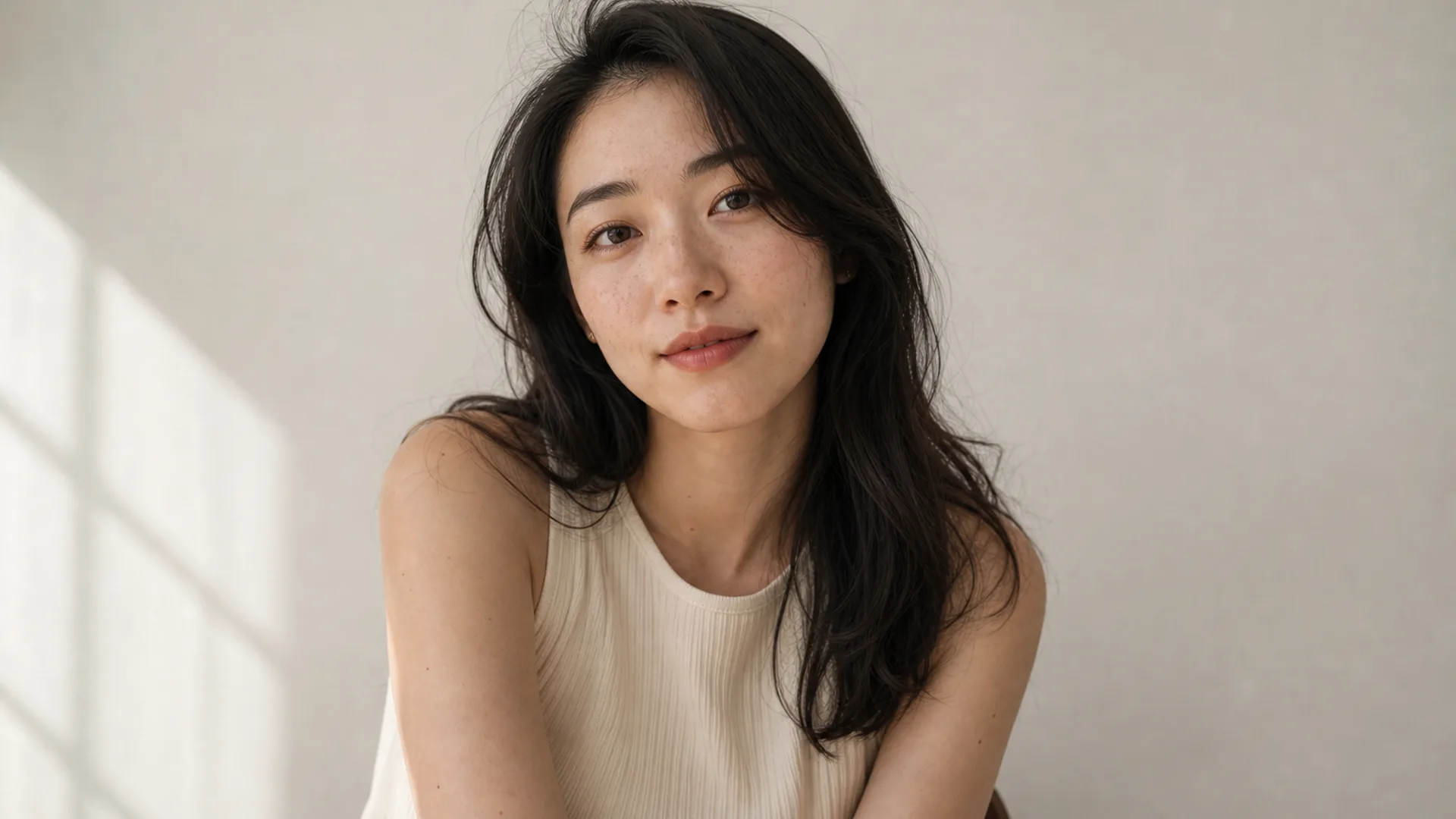
A GPT Image 2 prompt should describe an image you can inspect. Identify the subject, composition, lighting and important details. For edits, explain what the reference contributes and what should change. The eight examples below are editable input ideas, not measured output results.
Start with a clear brief
Describe the intended use, subject and action, setting, framing, light and materials. State priorities when requirements conflict. Use a language you can express precisely; English terms are optional, not a guarantee of better results. Camera and resolution words describe intent, not physical equipment or downloaded dimensions.
For example: Create a product image with the complete bottle visible on the left and open space for a headline on the right. Use soft window light and a simple pale background.
Separate creation from editing
A new image needs the overall scene. An edit needs a reference image, preservation requirements and a specific change. Upload material you have permission to use. Identity, text and product details can still change, so inspect each revision. The AI Photo Editor provides a dedicated editing entry.
Give text and composition explicit roles
Provide exact wording, placement and type direction. Start with a short headline when exploring a layout, then proofread. Add longer or precisely controlled copy in a design tool if needed. For references, explain whether each image supplies subject, layout or visual direction.
Example 1. Daylight portrait
Use case: brand pages and social portraits that must keep freckles, crop, and light direction.
Prompt: Half-body portrait of a adult woman with natural freckles and visible pores, soft daylight from a large window on the left, gentle shadow under the jaw, off-white wall, face slightly right of center, 85mm lens, f/2.0 shallow depth of field, both ears visible, no beauty blur, no plastic skin, no heavy makeup
Rewrite tip: swap age feel and hair note in the first clause only; keep the light and “no plastic skin” block unchanged for one full round.
Example 2. Product hero with short label text
Use case: ecommerce packaging and ads that need a readable product name.
Prompt: Minimal product still life of a matte white skincare bottle labeled “AURA CARE” in clean black sans-serif, centered on beige seamless backdrop, softbox key from upper left, gentle bounce fill, crisp label typography, generous negative space on the right for headline text, commercial photography, no harsh reflections, no extra props
Rewrite tip: change only the quoted label string and bottle color first; do not restyle light until the text is stable.
Example 3. Reference-led background replace brief
Use case: campaign refreshes using an existing portrait as a reference.
Prompt: Keep the same woman and facial identity, replace the busy cafe background with a clean light-gray seamless studio backdrop, preserve hair strands and natural skin texture, even soft studio light, head-and-shoulders crop safe for circular avatar, no beauty filter, no face reshape
Rewrite tip: in an edit workflow, delete scene storytelling words; only describe what changes and what must remain.
Example 4. Fashion editorial with brand color control
Use case: key visuals that need a specific accent color without melting skin.
Prompt: Editorial fashion portrait of a woman in a tailored black blazer, cinematic rim light from behind, cool teal fill from the front matching brand accent, sharp catchlights, subtle film grain, medium close-up on 50mm, realistic wool fabric texture, natural skin detail under colored light, no oversaturated glow
Rewrite tip: replace “teal” with your brand hex-name in words (deep emerald fill); add keep natural skin detail under colored light if faces wash out.
Example 5. Lifestyle interior with named materials
Use case: home and lifestyle campaigns that should feel photographed, not HDR.
Prompt: Woman reading by a large window in a quiet apartment, soft morning side light, linen curtains, light oak table, shallow depth of field, calm lifestyle photography, natural color grading, 35mm documentary feel, realistic interior materials, no HDR look, no staged smile
Rewrite tip: name two real materials you can verify in the frame; vague “cozy aesthetic” is weaker than “linen” + “oak”.
Example 6. Professional headshot crop
Use case: team pages, resumes, and LinkedIn-style avatars.
Prompt: Professional head-and-shoulders portrait of a woman, clean light-gray seamless background, even soft studio light, confident calm expression, centered face with safe crop for circular avatar, natural skin texture, business-casual knit top, no heavy retouching, no harsh shadows
Rewrite tip: draft here, then finish crop and backdrop control in the AI Headshot Generator.
Example 7. Poster frame with one headline
Use case: event or launch visuals that need a single readable title.
Prompt: Vertical poster composition of a confident woman in a city golden-hour street, warm backlight, shallow depth of field, large clear headline text “OPEN STUDIO” in bold condensed sans-serif in the upper third, high contrast but readable type, photographic look, space under the text kept clean, no extra slogans, no watermark
Rewrite tip: one headline only; if letters break, regenerate with identical spelling before changing wardrobe or location.
Example 8. Neon night portrait under colored light
Use case: music covers and nightlife frames that still look like photography.
Prompt: Night portrait of a woman under cyan and magenta neon signs, wet street reflections, shallow depth of field, cinematic contrast, rain-damp hair strands, realistic skin under colored light, 50mm lens, moody urban atmosphere, no oversaturated glow, no melted facial features
Rewrite tip: remap neon colors to a brand pair; keep the “realistic skin under colored light” clause every round.
Check and revise the result
Inspect faces, limbs, product structure, lettering and crop. Choose one important issue for the next revision and record what changed. Instructions inside the examples express goals rather than identity or quality guarantees. A headshot tool does not replace checking whether a portrait suits its intended use.
For a background edit, upload the original and compare facial features and product outlines afterwards. For text errors, check spelling and reduce unrelated copy. For an incorrect crop, adjust composition and supported aspect-ratio settings.
Frequently asked questions
Must I write prompts in English?
No. Use a language that expresses your requirements clearly, and provide exact text for lettering.
Can these prompts guarantee the same person in every image?
No. References can communicate identity requirements, but outputs need inspection.
Can I paste Midjourney parameters into GPT Image 2?
Do not treat product-specific commands as universal settings. Use the current interface’s options.
Are the examples tested comparisons?
They are input examples, not controlled performance comparisons or evidence of a model ranking.
How do I choose between GPT Image 2 and 2.5?
Review available options and actual results for your task. The GPT Image 2.5 model page introduces the related version.
Continue creating
Open the GPT Image 2 model page or AI Image Generator, review the available model, settings and estimated credits, and adapt one example. For selection and delivery, see the AI art workflow.